Accrual Forecasting Line Chart Design in Excel
An employee who can see the growth trajectory of their income is motivated differently than one who receives a paycheck with no visibility into the future. Accrual forecasting in Excel solves two problems at once: for the company, it's a payroll planning tool that accounts for seasonality and growth targets; for the employee, it's tangible confirmation that their development translates into real numbers on a stylishly designed line chart.
A Beautiful and Practical Line Chart Design in Excel
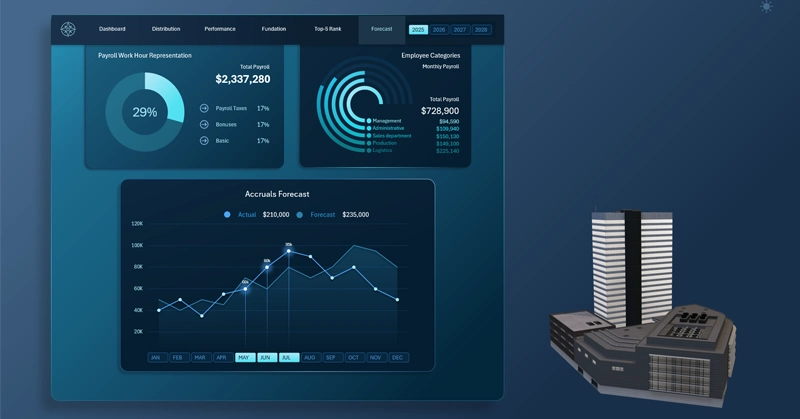
Accrual forecasting block: multiple line charts with markers and colored fill under the curve display the projected growth of salary payouts by month — accounting for seasonal fluctuations and planned performance bonuses for employee achievements.
Why sales seasonality is not the enemy of a forecast but a required variable within it: how do you factor in peaks and dips when planning bonus accruals? Forecasts don't always match reality — but it's the planning process itself that makes every move intentional.
An example of how a line chart is used in practice for comparative analysis of projected versus actual metrics in Excel:

Large Payroll Fund Analysis Dashboard in Excel
The accrual forecasting block is a reminder that financial planning exists not to predict the future, but to prepare for it. A chart with markers doesn't promise an exact match between actuals and the forecast — it creates a frame of reference in which any deviation becomes a reason for analysis, not for panic.
Seasonality is accounted for, growth potential is visible, and the logic of the bonus trajectory is transparent. This is exactly the kind of tool that transforms a payroll dashboard from a reporting document into a living instrument for strategically managing both people and money at the same time.
 Download the Beautiful Line Chart Design Template for Forecasting in Excel

Data Visualization Charts for Interactive Report Creation in Excel.
Dashboard Templates