Consolidated Excel dashboard for logistics route analysis
In Excel, you can create informative dashboards for analyzing product sales. Effective assortment control and analytics require a clear and interactive approach. Interactive product cards in Excel allow you to visualize each product, its features, and performance metrics, making the dashboard convenient and easy to analyze.
Features of interactive product cards for analysis
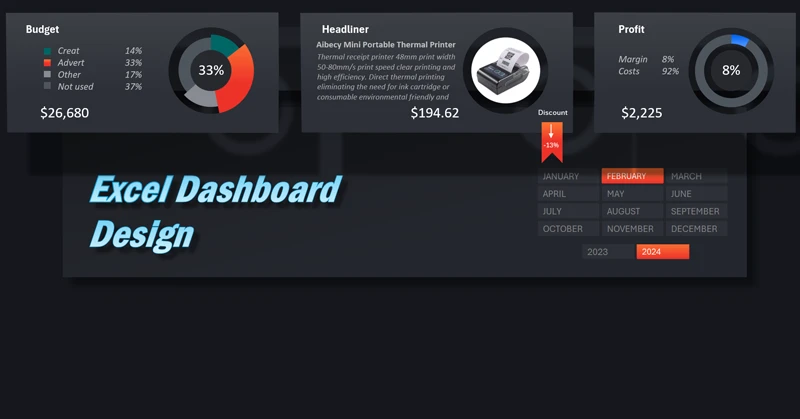
Each product card on the dashboard displays key information:
- price,
- discount,
- quantity,
- sales and rating,
- brief product description.
When dashboard parameters change, such as selecting a reporting period, the cards update automatically. Supporting charts also refresh summary information about product sales statistics.
You can learn how to create and configure dynamic product cards in Excel from the video tutorial below. You can also download a ready-made template for practical use or training. To see how to use interactive cards, check out the sample dashboard:
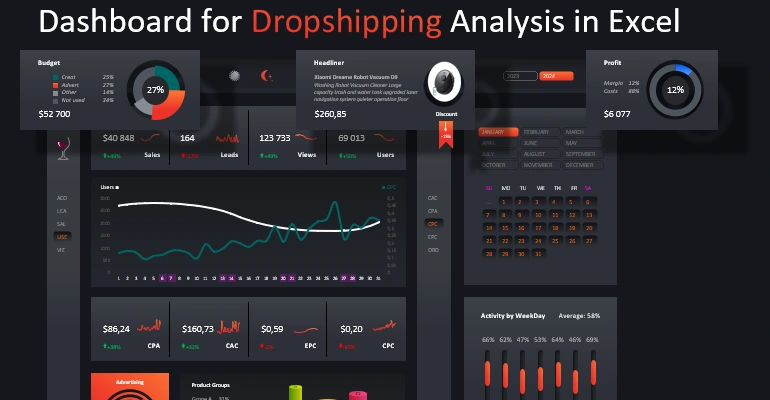
Dashboard for product sales analysis in Excel
Interactive product cards turn Excel into a powerful visual tool for managing assortment. They allow you to quickly evaluate sales performance, make decisions on restocking or optimizing products, and make the dashboard more intuitive and clear for your team.


Data Visualization Charts for Interactive Report Creation in Excel.
Dashboard Templates